How to perform the Manual Data Guard Switchover on Oracle 19c Database
How to Perform a Manual Data Guard Switchover on Oracle 19c
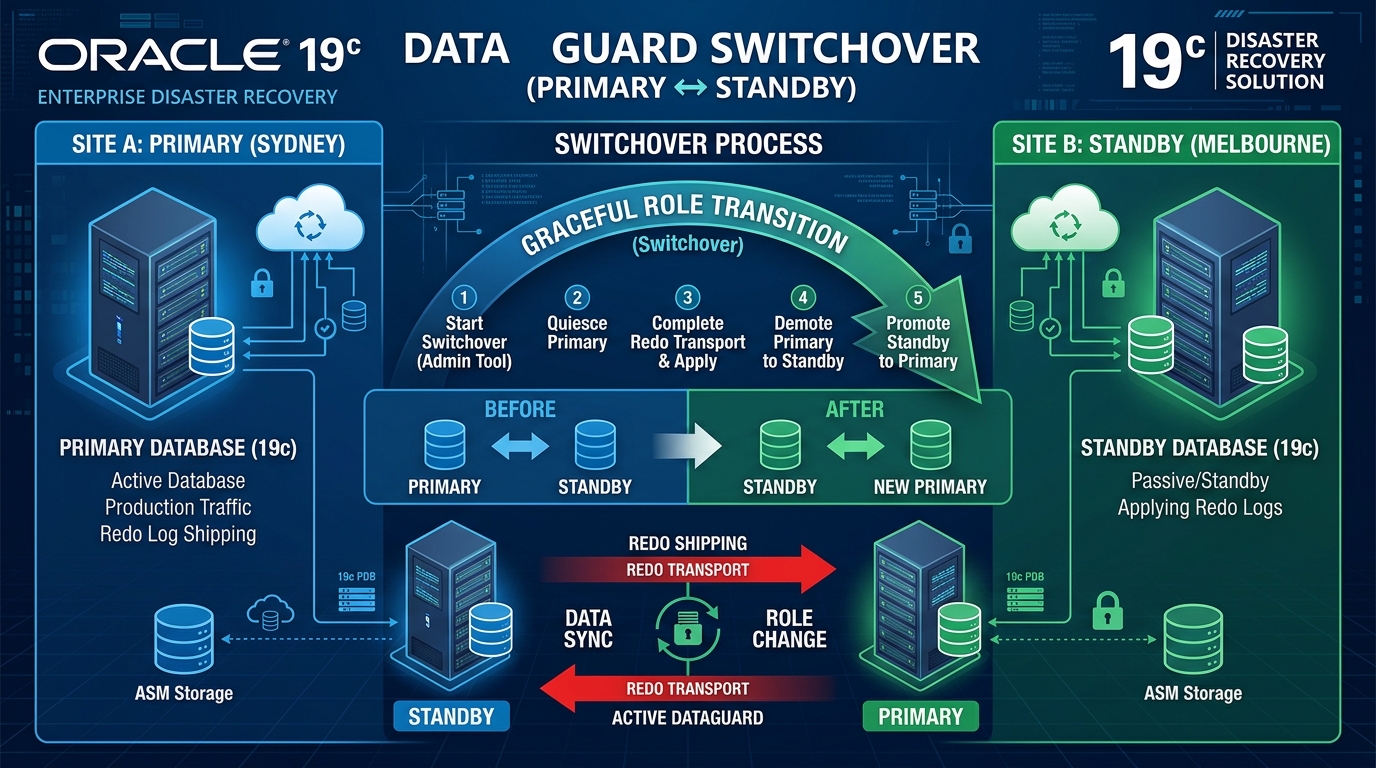
Managing an Oracle Data Guard environment is a key responsibility for any Oracle DBA. One of the most important activities is the Switchover—a planned role reversal where the Primary database becomes Standby, and the Standby becomes the new Primary.
Switchover is safe, controlled, and does not involve any data loss.
This guide walks you through the manual switchover steps in Oracle 19c, explained in a simple and easy-to-follow way.
🔍 What is a Switchover?
A Switchover is a planned role change between the primary and standby databases.
It is used during:
- Maintenance activities
- Hardware upgrades
- Load balancing
- Testing disaster recovery readiness
Unlike Failover, switchover does not involve data loss.
🧭 Before You Start: Pre-Checks
Before performing a switchover, always verify that both primary and standby databases are healthy.
1. Check Data Guard Status (Primary)
SELECT SWITCHOVER_STATUS FROM V$DATABASE;
You should ideally see:
TO STANDBY
2. Check Redo Apply Status (Standby)
SELECT OPEN_MODE, DATABASE_ROLE FROM V$DATABASE;
Expected:
READ ONLY WITH APPLY
PHYSICAL STANDBY
3. Check if Apply Lag Is Reasonable
SELECT MRP_STATUS, APPLY_LAG FROM V$DATAGUARD_STATS;
Everything good? Proceed!
🔄 Step-by-Step Manual Switchover Process
Step 1 — Switchover on Primary
On the Primary Database:
ALTER DATABASE SWITCHOVER TO STANDBY;
This command converts the primary into a standby.
After the command completes, shutdown and mount the new standby:
SHUTDOWN IMMEDIATE;
STARTUP MOUNT;
Step 2 — Transition the Standby to Primary
Now login to the Standby Database:
ALTER DATABASE SWITCHOVER TO PRIMARY;
After successful role transition:
SHUTDOWN IMMEDIATE;
STARTUP;
Your standby is now the new Primary.
Step 3 — Start Redo Apply on the New Standby
Go back to the former primary (now a standby):
ALTER DATABASE RECOVER MANAGED STANDBY DATABASE USING CURRENT LOGFILE DISCONNECT FROM SESSION;
This enables real-time apply.
Step 4 — Verify
On New Primary
SELECT OPEN_MODE, DATABASE_ROLE FROM V$DATABASE;
Expected:
READ WRITE
PRIMARY
On New Standby
SELECT MRP_STATUS FROM V$MANAGED_STANDBY;
If MRP is running → You’re good!
🎉 Switchover Completed Successfully
At this point:
- Old Primary → Standby
- Old Standby → Primary
- Redo Apply is running
- No data loss
Your Data Guard environment is fully operational again.
📝 Tips & Best Practices
- Always ensure archivelog shipping is healthy before switchover.
- Use Data Guard Broker (DGMGRL) for easier management when possible.
- Keep both servers’ time synchronized (NTP enabled).
- Perform switchovers periodically to ensure DR readiness.
Conclusion
Performing a manual Data Guard Switchover in Oracle 19c is straightforward when you follow a clear set of steps. It’s a powerful way to test your disaster recovery setup, perform maintenance, and ensure high availability without any downtime for users.